GPS tracker for seniors: location sharing and scheduled check-ins
A GPS tracker for seniors is a device that allows family members or caregivers to monitor the location of an older adult and receive updates at set times. These trackers are designed to support independent living by providing a way for seniors to stay connected without needing a smartphone. They typically combine location sharing with scheduled check-ins, offering a balance between safety and privacy. The concept of an independent senior tracker: location sharing and scheduled check-ins has become more common as families seek tools that respect the autonomy of older adults while offering peace of mind to those who care for them.
These devices are used by seniors who live alone, have memory issues, or enjoy spending time outdoors. The tracker is often worn as a pendant, clipped to a belt, or carried in a pocket. It uses GPS and Wi-Fi to determine position and can send that information to a family contact through a mobile app or web portal. Scheduled check-ins allow the senior to confirm they are okay at preset times, or the device can automatically notify a contact if no check-in occurs.
How location sharing works
Location sharing in a senior tracker relies on satellite signals from the Global Positioning System and, in many models, on nearby Wi-Fi networks to improve accuracy indoors. The device calculates its position and transmits it to a server, which the family can view on a map through a smartphone app. Some trackers update location every few minutes, while others update only when the senior moves or when a check-in is requested.
Privacy settings are a key part of location sharing. Many trackers let the senior control who sees their location and when. For example, a senior might choose to share location only during daytime hours or only with specific family members. Some devices allow the senior to pause location sharing entirely, which can be useful when they are at home and do not want to be tracked. This level of control helps maintain the senior’s sense of independence while still providing safety benefits.
Scheduled check-ins and alerts
Scheduled check-ins are a feature that prompts the senior to confirm they are well at regular intervals. The check-in can be a simple button press on the tracker, or it can be automatic based on movement. If the senior does not check in within a set window, the device sends an alert to the family contact. This system is useful for seniors who may forget to call or text but are otherwise fine.

Some trackers combine scheduled check-ins with an emergency button. If the senior presses the button, the device sends an immediate alert to the family contact and shares the current location. This can be helpful if the senior falls, feels unwell, or gets lost. The combination of scheduled check-ins and an emergency button provides a layered approach to safety: the check-in catches situations where the senior cannot act, while the button allows them to call for help when they can.
An independent senior tracker: location sharing and scheduled check-ins often includes fall detection as an additional safety layer. Fall detection uses accelerometers and gyroscopes to sense a sudden impact and a change in orientation. If a fall is detected, the device sends an alert to the family contact, even if the senior does not press the emergency button. This can be especially important for seniors who live alone and are at higher risk of falls.
Two-way calling and voice features
Many senior trackers include a speaker and microphone for two-way calling. This allows the family contact to speak directly to the senior through the device, without the senior needing to hold a phone. The call is usually initiated by the family contact through the app, and the senior can answer by pressing a button on the tracker. Some devices also allow the senior to call a pre-programmed number by pressing a dedicated button.
Two-way calling can be useful in several situations. If the senior does not respond to a check-in, the family contact can call to check on them. If the senior feels confused or lost, they can call for help. The feature also allows the senior to have a brief conversation without needing to manage a smartphone, which can be challenging for those with vision or dexterity issues.
Battery life and charging
Battery life varies between models and depends on how often the device updates location and how frequently check-ins occur. Most trackers need to be charged every few days to a week. Some models have a low-battery alert that notifies the family contact when the device needs charging. A few trackers use replaceable batteries that last for months, which can be convenient for seniors who may forget to charge a device.
Charging is usually done via a magnetic dock or a USB cable. The senior may need help with charging if the dock is not easy to use. Some families set a routine, such as charging the device overnight, to ensure it is always ready. A device with a long battery life can reduce the need for frequent charging and make the tracker more reliable for daily use.

Privacy and data security
Location data is sensitive, and senior trackers handle it in different ways. Most devices encrypt location data during transmission and store it on secure servers. Some trackers allow the family to delete location history or set limits on how long data is kept. Privacy settings can also control which family members have access to the data.
Seniors and their families should review the privacy policy of the tracker manufacturer to understand how data is used. Some companies share data with third parties for analytics or advertising, while others keep data strictly for the intended purpose. Choosing a tracker with clear privacy practices can help both the senior and the family feel comfortable with the system.
Choosing a tracker for a senior
Selecting a tracker involves matching the device features to the senior’s daily routine and mobility. A senior who spends most of their time at home may need a device with good indoor location accuracy, while a senior who walks or takes public transport may need a tracker with strong GPS performance and a long battery life. The ease of use of the device is also important: a simple interface with large buttons is easier for seniors with limited dexterity or vision.
Cost is another factor. Some trackers require a monthly subscription for cellular data and the app service, while others have no ongoing fees. The absence of a monthly fee can make a tracker more affordable over time, especially for families on a fixed budget. The initial purchase price of the device also varies, and some models include a warranty or return period.
Family contact features, such as how many people can receive alerts and how they are notified, can differ between trackers. Some allow multiple family members to view the location and receive alerts, while others limit the number of contacts. The ability to customize check-in times and location sharing settings can also affect how well the tracker fits into the senior’s life.
Integration with daily life
A senior tracker works best when it becomes part of the senior’s normal routine. Wearing the device every day and charging it regularly are habits that take time to establish. Some families introduce the tracker gradually, starting with location sharing during outings and adding scheduled check-ins later. This approach can help the senior feel comfortable with the device and understand its benefits.
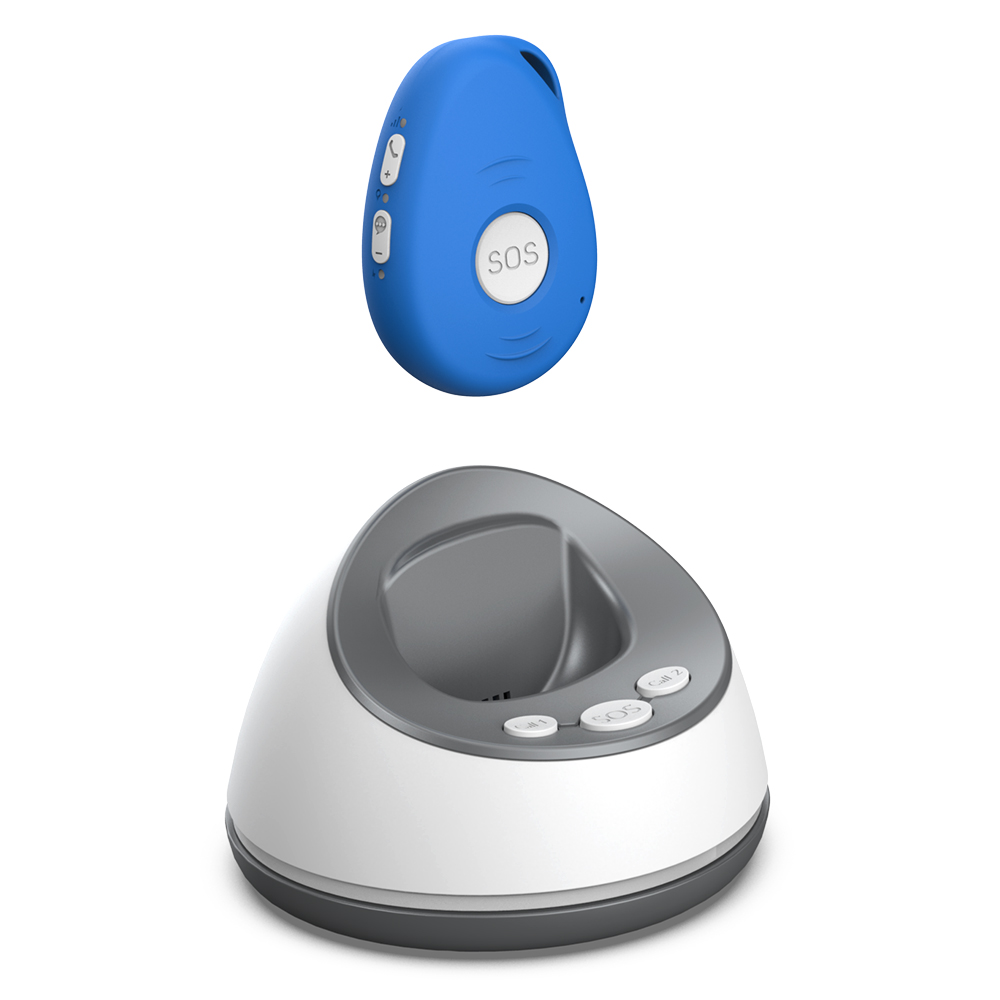
Trackers can also be used in combination with other safety measures, such as a medical alert system or a home monitoring camera. The location sharing and check-in features of the tracker fill a gap that other devices may not cover: they provide information about the senior’s whereabouts and well-being throughout the day, not just in an emergency. This can reduce the need for frequent phone calls or visits, giving the senior more freedom while keeping the family informed.
For seniors who are still active and enjoy going out, a tracker can provide reassurance to both the senior and the family. Knowing that help can be summoned quickly if needed allows the senior to maintain their independence for longer. The scheduled check-in feature can also serve as a gentle reminder for the senior to stay connected with their family, which can be a comfort for everyone involved.
