Choosing the Right Medical Alert System for Your Family
When a loved one starts to slow down or faces a chronic health condition, the quiet worry that settles in can be hard to shake. You want them to keep their independence, to stay in their own home and live their life on their own terms. But you also need to know they are safe, that help is never more than a button press away. That is where a good Medical Alert system becomes not just a gadget but a genuine support for the whole family.
I have spent years helping families navigate these decisions. I have seen the relief on a daughter's face when she realises her mother can still garden in the backyard, knowing that if she falls, someone will respond. I have also seen the frustration when a system is too complicated or the monthly fees keep climbing. So let me walk you through what really matters when you choose a Medical Alert system, drawing on real experience and a bit of honest trade-off thinking.
What a Medical Alert System Actually Does
At its simplest, a Medical Alert system connects a person to a response centre with the push of a button. The wearer presses a pendant or a wristband, and within seconds a trained operator speaks through a base unit, asking what is wrong. If there is no answer, or if help is needed, the operator contacts a family member or dispatches emergency services. But the details vary a lot, and those differences matter.
Some systems work only at home, with a base station that has a range of about 200 to 400 metres. Others use cellular or GPS technology and work anywhere. Some are landline-based, while others run on a mobile network. Each setup has its strengths and its weaknesses, and the right choice depends on the person's lifestyle and living situation.
Home-Based vs Mobile Systems
For someone who rarely leaves the house, a home-based unit is often the best value. The base station plugs into a phone line or a cellular network, and the pendant communicates with it wirelessly. The range covers the house and garden, and the monthly cost is usually lower than a mobile plan. I have seen these work beautifully for elderly parents who spend most of their time in a familiar environment.
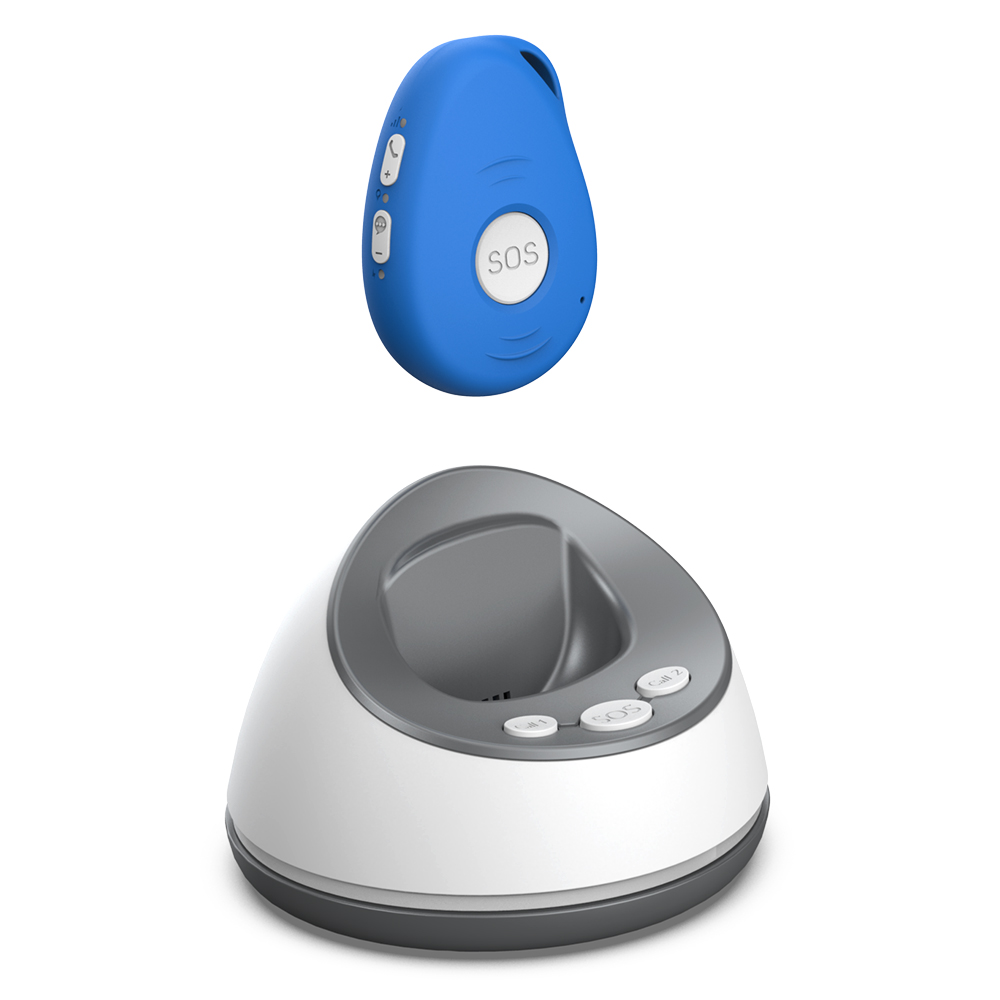
But if the person is active, still driving, or enjoys walking to the shops, a mobile system is worth the extra cost. These pendants have built-in GPS and a cellular chip, so they work wherever there is coverage. The trade-off is that the battery needs charging more often, and the monthly fee is higher. I have had clients whose father walked his dog every morning along a river path, and the mobile system gave him the freedom to do that while his daughter stopped worrying every time he was ten minutes late.
Fall Detection: A Feature, Not a Safety Net
Many systems now offer automatic fall detection. The pendant senses a sudden impact or a change in angle and sends an alert even if the person cannot press the button. This sounds like a perfect solution, and in many ways it is a big step forward. But no fall detection is perfect. It can miss a slow, controlled slide to the floor, or it can trigger a false alarm when someone drops the pendant into a sink. My advice is to treat fall detection as a helpful extra, not a replacement for pressing the button when you can. And if you choose a system with fall detection, test it regularly and understand how it works in real life.
Response Times and the People on the Other End
The quality of the response centre is something many people overlook. They focus on the hardware and the price, but the voice on the speaker is the actual lifeline. You want a response centre that is staffed 24/7 by trained operators, not an automated system that sends a generic alert. I have listened to recordings where an operator calmly talks a frightened older person through what is happening, staying on the line until paramedics arrive. That kind of care cannot be replaced by an app or an algorithm.
Ask the company how they train their operators and what their average response time is. A good centre will answer a call within 30 seconds, and they will have protocols for different situations. Some centres can even dispatch a neighbour or a family member who lives nearby, which can be faster than waiting for an ambulance for a non-life-threatening issue.
Contracts, Fees, and Hidden Costs
Pricing models vary widely. Some companies ask for a long-term contract, while others offer month-to-month plans. Some charge a one-time equipment fee, and others include the hardware in the monthly cost. I have seen families locked into expensive contracts because they did not read the fine print. My rule of thumb is to avoid any contract longer than 12 months, and to ask about cancellation fees upfront. Also check if there is an extra charge for fall detection or for the mobile app. These add-ons can double the monthly bill without you realising it.
Here is a quick comparison of common pricing models:

- Home-based, landline: $20 to $35 per month, no equipment fee.
- Home-based, cellular: $25 to $40 per month, may include a small equipment fee.
- Mobile with GPS: $35 to $55 per month, often includes the pendant.
- Fall detection add-on: $5 to $15 per month extra.
These are rough numbers based on the New Zealand market. Always ask for a full breakdown before you sign anything.
Battery Life and Maintenance
A pendant that runs out of battery is just a piece of plastic. Most home-based pendants have a battery that lasts two to five years, and the base station usually has a backup battery for power outages. Mobile pendants need charging every day or two, depending on usage. Some newer models have a longer battery life, but the trade-off is a larger pendant. I have had clients who chose a slim, stylish pendant and then forgot to charge it every night. A slightly bulkier pendant that lasts a week on a charge can be more practical for someone who is not tech-savvy.
Test the system monthly. Press the test button and confirm that the response centre answers. This takes two minutes and can prevent a failure when it matters most.
Involving the Whole Family
A Medical Alert system is not just for the wearer. It is a tool for the whole family. When my own grandmother got a pendant, my mother stopped calling her three times a day to check if she was okay. The pendant gave my grandmother her privacy back, and it gave my mother peace of mind. That is the real value. So involve the family in the choice. Let the person who will wear the system try the pendant, see how it feels, and decide if they are comfortable with it. If they hate wearing it, it will end up in a drawer.
Practical Tips Before You Buy
Here are a few things to check before you commit to any system:
- Does the pendant work in the shower? Water resistance is essential.
- Can the base unit be moved to another room if needed?
- Does the system work during a power outage?
- Can family members be added to the contact list?
- Is the pendant comfortable enough to wear 24/7?
These questions seem basic, but I have seen families overlook them and regret it later. A pendant that cannot go in the shower means the person has to take it off and is unprotected during a time when falls are common.

The Big Picture
Choosing a Medical Alert system is a personal decision. It is not about the flashiest features or the lowest price. It is about finding a reliable, comfortable, and simple system that fits the person's daily life and gives the family confidence. The best system is the one that gets used every day, that feels like a natural part of the routine, and that works when it is needed.
I have seen families struggle with systems that were too complex, with pendants that were too heavy, with contracts that were too restrictive. I have also seen the quiet relief when a good system clicks into place. The goal is to support independence, not to replace it. A well-chosen Medical Alert system does exactly that. It does not take away freedom. It gives the person the freedom to live their life, knowing that help is always close by.
